You did not decide to run five Claude Code sessions. One is fixing a failing test, so the migration goes to a second. The rename in the other repository goes to Codex. Two of the five you did not open at all: the first session opened them. You can see one of them at a time.
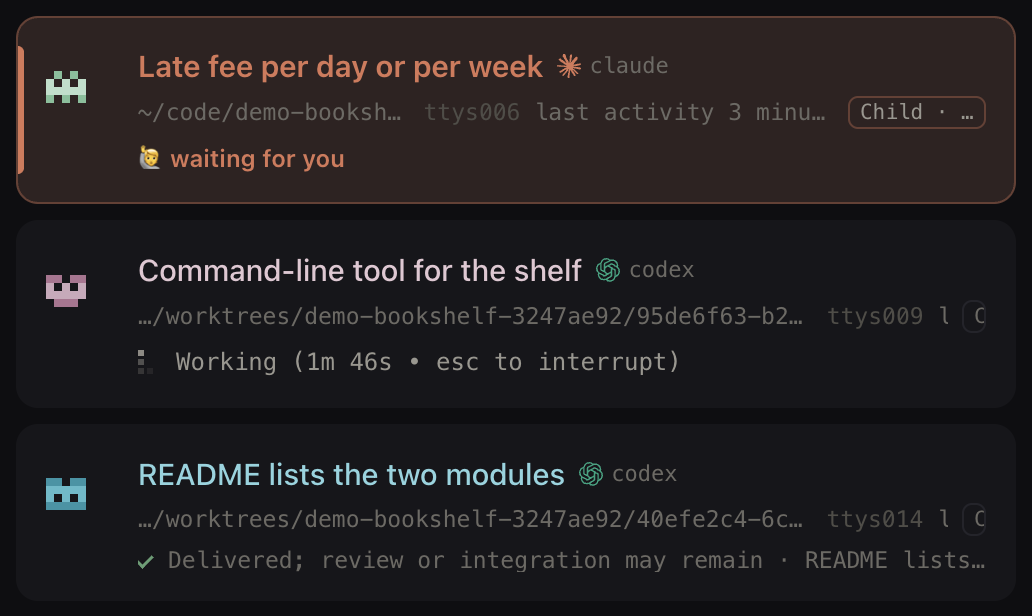
Clawdline is a free local daemon and web console for macOS and Linux that puts them in one list. It attaches to what is already running on your machine instead of starting it. Every row answers four separate questions instead of showing one status light.
Silence in a terminal means two opposite things
A session that has printed nothing for ten minutes is either thinking or waiting for you, and the tab looks the same either way. Everything worth waiting for is slow, so slowness is not a signal, and the turn from slow to blocked is invisible.
A terminal tab is an excellent view of one session and no view at all of the other four. So every twenty minutes you walk the tabs to find the one stuck on you. The fifth died an hour ago, and nothing was going to tell you.
If you are running two sessions, close this page and keep your tabs. Two fit in your head, and
⌘1 and ⌘2 beat any list.
Three things break that together. The sessions outnumber the ones you remember to check. Some were started by other sessions, so they are not where you left them. And the state you care about most is silence: a bell fires when a session speaks, and the one waiting for you has gone quiet.
Launching sees only what it started; attaching sees what is already there
The other design owns the process it launches, and knows everything about it first-hand. Ours does
not. You keep starting sessions the way you already start them: claude, codex, in the terminal
you already use. The daemon attaches to what is there. Our install page states the whole scope of that
promise: no MCP server, hook, assistant plugin, wrapper, Cloud account, or project migration is
required.
| A row of terminal tabs | A tool you launch your assistant through | Clawdline | |
|---|---|---|---|
| Which sessions appear | All of them, one at a time | The ones you started its way | The ones running on the machine it can reach, however they were started |
| What you change to get it | Nothing | The command you type to begin work | Nothing on iTerm2; on other terminals, one named tmux session |
| Where its information comes from | The pixels in front of you | The process it owns, first-hand | Worked out from outside — the transcript file, the screen, the process |
The middle column wins the third row outright, and what it cannot show you is a session it did not start. Tuesday’s tmux window, the one running when you installed Clawdline, every session another session started. By the afternoon that is a real fraction of them.
Attaching is paid for in which terminals it can reach. iTerm2 needs no setup; every other terminal — Terminal.app, Warp, Ghostty, Kitty, Alacritty, Tabby — needs the assistant inside a named tmux session. A plain shell elsewhere cannot receive text from Clawdline reliably; the shells page has the detail. That is one step per terminal, not one per session, and the five-step first-session check proves the route before you trust the list. Use neither iTerm2 nor tmux and Clawdline cannot see your sessions, with no setting to change it.
One status light cannot answer the question you are actually asking
You never ask five sessions how they are doing. You ask which one you need to open, and a badge — running, idle, done — cannot answer that. So a row carries four independent answers:
| What the row answers | The question | Why it is not one of the others |
|---|---|---|
| Terminal activity | Is anything happening in this pane right now? | It observes a process; it does not prove the work is finished |
| What to do next | Answer it, wait, hand it work, review a delivery, or nothing | A session can be working and still be the one waiting on you for something else |
| What is still owed | Is a decision or obligation outstanding while other work continues? | It rides alongside whatever else is true, rather than replacing it |
| Whether it is safe to close | Is there enough current evidence to end this exact session? | A terminal that looks finished is not evidence that nothing is outstanding |
The fourth is the one people get wrong, and it costs them. A session can have delivered its answer and still owe a review, a correction, or a landing, and the terminal looks equally done either way. What each state means and what to do about it has its own post; so does the gap between delivered and landed.
Claude Code and Codex rows sit in one list, on the same four axes. Same words too: session, task, project, machine, written down here.
One light
Four separate marks
What Clawdline does not do
It does not write your code. Claude Code and Codex do that, in your own shell and under your own accounts.
It runs nothing in a data centre; there is no cloud runner at any tier. The optional Cloud half lets a phone reach the machine that is already doing the work. Where the work actually runs is the longer answer.
And it is not finished. You build the local daemon and console from source on macOS or Linux; Cloud enrolment is still a preview. Nothing here can be bought yet.
Connect one session and send it something harmless
Start an assistant the way you always do, open the console, and check that the target it names is the session you meant. Send it one harmless prompt and read the answer back: five short steps, after the install page.
Everything else can wait. The largest is sessions handing work to other sessions, bounded deliberately at one level deep, by the daemon rather than by anyone’s instructions.