ToolRead 2 files
docs/release.md · go.mod planning · 3 Child Sessions · landing owner
+◉
Continue this Session…
SendClawdline

Apple Silicon · macOS 13+
Install the latest stable release (macOS / Linux)
curl -fsSL https://clawdline.com/install.sh | sh Verification requires Python 3 and OpenSSL 3
The same Sessions, two different comprehension costs
Nothing on this machine matches that.
Press a row. This is the app's own list — Clawdline reads the terminals you already have open.
docs/release.md · go.modContinue this Session…
Sendsrc/components/SessionList.astroContinue this Session…
SendPUBLIC-DOCS-STYLE.mdContinue this Session…
Sendscripts/deploy-marketing.pyContinue this Session…
Sendinfra/cloudflare.tfContinue this Session…
Sendsrc/import/PhotoRules.swiftContinue this Session…
SendSources/TerminalInventory.swiftContinue this Session…
SendOpus 5 with xhigh effort · Claude Max
~/code/clawdlinePrepare the 0.4 release. Compare the public docs, test evidence, and exact candidate tree before landing.
Reading the release checklist and comparing it with the exact candidate tree.
The checklist matches the candidate tree. Next I will collect each Child Session receipt before the Root lands the release.
/modelto changeTip: Try the Desktop app. Run 'codex app'
Make the homepage explain how Clawdline organizes the same work that appears in Terminal tabs.
Editing the homepage Session hierarchy and checking the mobile comparison.
The mobile layout is ready for your eyes. I sent the design below; tell me what to change before I hand the result back.
Opus 5 with xhigh effort · Claude Max
~/code/clawdline-cloudReview the Status vocabulary after the homepage implementation arrives.
Waiting for the implementation receipt before reviewing the status labels.
No review has started yet. This Session will continue as soon as the implementation result is available.
/modelto changeTip: Try the Desktop app. Run 'codex app'
Verify the Cloud release path and return evidence for every public route.
Deployment smoke checks passed. Preparing the evidence summary for the Root.
All public and localized routes returned the expected status. The result is delivered and waiting for Root review.
Opus 5 with xhigh effort · Claude Max
~/code/beaconDeploy the approved build to production when I confirm the final release window.
Approval is required before the production deployment can begin.
No deployment has started. Reply with approval or a new release window to move this Session forward.
/modelto changeTip: Try the Desktop app. Run 'codex app'
Organize the photo import rules and report when this Session can accept another task.
The previous request is complete. This Session is ready for the next instruction.
The rules are organized and no action is running. Ready means this Session can accept work; it is not a closeability claim.
/modelto changeTip: Try the Desktop app. Run 'codex app'
Inspect this attached legacy terminal without guessing when its screen evidence is incomplete.
The terminal is attached, but its latest output cannot be classified safely.
The Session remains visible as Unknown. Clawdline will update it only after fresh terminal evidence arrives.
Each Terminal tab can show its own project, assistant, and current output, but the Root/Child relationships, wait dependencies, and overall delivery progress across seven tabs still have to be reconstructed by hand.
One terminal can show its own work, but it does not organize the relationships between Sessions.
Answer an Agent, leave a to-do, then follow delivery on the Board.
See who needs you, delegate work, and follow delivery.
Clawdline is not another coding assistant. It operates the assistants and terminals you already use.
See who is working, who needs you, and whose screen is unreadable.
Sessions and statesPass work to another Session, follow the result, and confirm the change landed.
Dispatch, handoff, and landingFollow an assignment from review to deployment, with evidence at every step.
Board and plansA long command finishes, then the Session gets its result and continues.
How callbacks workAn Agent asks a question with suggested replies you can send directly.
How attention notes workLeave work for the Session to pick up later, without interrupting this turn.
How Session to-dos workThe root writes a task down and asks for it to be run. Nothing else — it never touches a terminal, and it does not learn the child's id until the broker tells it.
Dispatching is remote code execution with a second step, so it holds its own credential: the orchestrator token is a local file, and no device token on this machine's API can dispatch with it — not with send, not over a tunnel. A fleet dispatch from the cloud is a different door, and it arrives at this same broker.
Depth stops at two, and the floor is what has teeth: a child's children may not dispatch at all, and the refusal is the broker's, not a request the child is trusted to honour.
The file appearing is the completion signal. Nothing is inferred from a quiet tab, and a child that dies without writing one is reported as exactly that.
Open a Session on your phone and keep the conversation going.
Open a running Session, resume an earlier conversation, or start a new Claude Code or Codex Session in a chosen Project. Attach a reference image, send the complete change to the Session that owns it, and let your machine dispatch implementation and verification.
Shipped phone interface flow
Clawdfather Claude Code
~/code/clawdline · ttys004coordinating documentation changesmarketing Codex
~/code/clawdline-cloud · ttys012checking the phone layoutrelease Claude Code
~/code/release · ttys007ready for workThe original Session brings delegated work back together.
For work larger than one conversation, the owning Session plans the lanes, starts independent Sessions, keeps review apart from authorship, and keeps the final merge. A pixel-marked Session appears only while it owns work; when its obligation is closed, it leaves and the evidence remains.
Clawdfather keeps the product truth and names who will land it.
01 / plan
Clawdfather keeps the product truth and names who will land it.
02 / dispatch
Each Session gets one complete brief and disjoint write paths.
03 / review
A reviewer who authored none of the delivery checks the held result.
04 / correct
The correction Session exists only for the sealed finding set.
05 / land
SAFE TO LAND is pending until the root integrates the reviewed bytes.
06 / verify
The exact commit tree passes once, then build, restart and health are recorded.
What the motion means: pixel-marked blocks are live Sessions. They appear only while they own work. Artifacts have no pixel identity; they remain after the Session leaves.
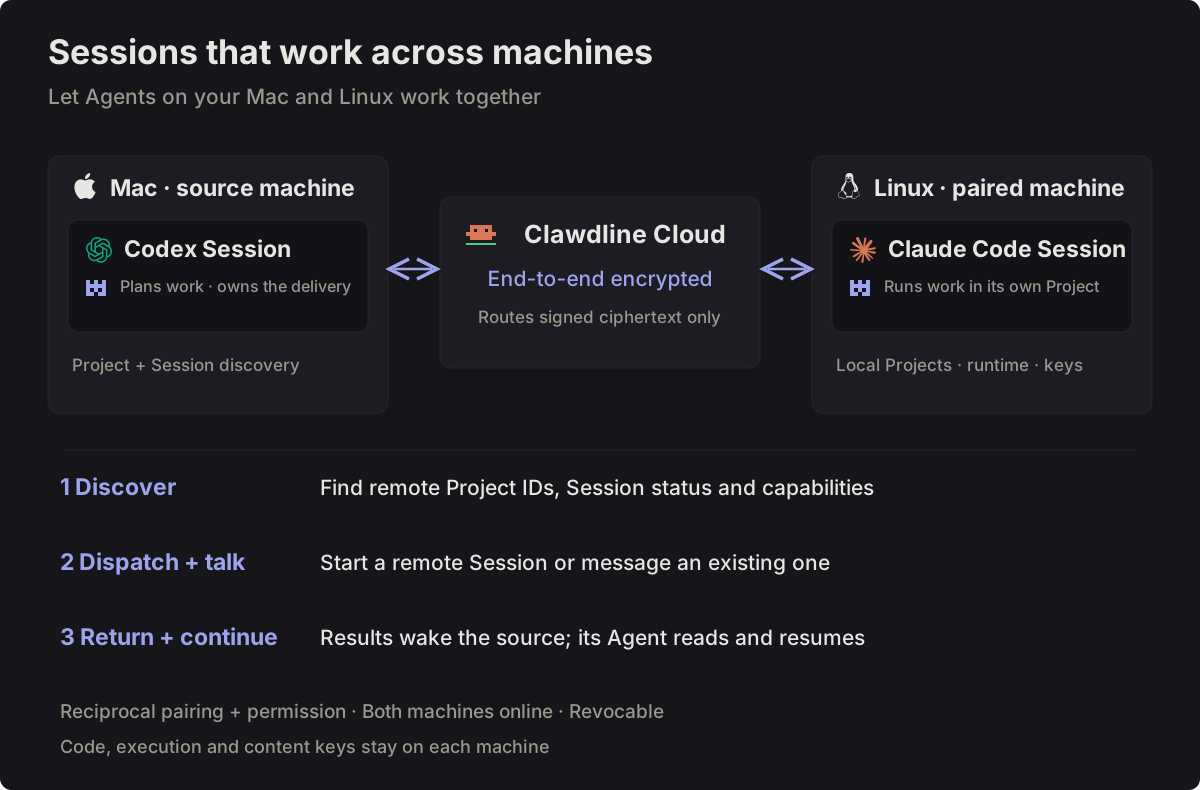
Let Sessions on different machines work together.
Codex on your Mac can discover Projects and Sessions on Linux, dispatch work to Claude Code, and exchange progress messages. Results notify the source Session so its Agent can resume, without you carrying instructions between machines.
Plans work · owns the delivery
End-to-end encrypted
Routes signed ciphertext onlyRuns work in its own Project
Find remote Project IDs, Session status and capabilities.
Start a remote Session or message an existing one.
Results wake the source; its Agent reads and resumes.
Connect your phone directly. Your terminal skips a relay hop.
After pairing, Clawdline tries a WebRTC data channel between your phone and Mac or Linux machine for live Terminal and Session reads. Removing the relay from that live path can make the Terminal more responsive. If ICE cannot connect, the end-to-end encrypted relay takes over.
The machine still checks pairing and permission · Encrypted relay takes over if direct is unavailable
Your machine runs the work. Cloud keeps it within reach.
Execution and the content key stay on hardware you own. Cloud carries signed ciphertext between your devices; it does not become another machine that can read or run your work.
Everything works without Cloud, and running work continues when Cloud is away.
Reach the same Sessions through end-to-end encrypted, signed commands.
Start with the Sessions you already use.
Install a release on macOS or Linux, and Clawdline organizes the Claude Code and Codex Sessions you already have open — no account and no change to how you work.